SNAP STORE v2.4.1 · WIDEVINE DRM · HTPC
Open-Source Author & Maintainer2026Open Source
Crunchyroll Ubuntu Desktop (Mouse, Trackpad & Smart Auto-PiP)
Crunchyroll Ubuntu Desktop is a free, open-source Linux desktop and HTPC client published on the Ubuntu Snap Store for Ubuntu, Debian, Fedora, Arch Linux, and Steam Deck. Built on Castlabs Widevine DRM, it adds Smart Auto-PiP (F10) with intact anime subtitles, linear 20%-100% Wayland/X11 window translucency, 1080p quality locking, and GNOME MPRIS media controls.
F9/F10Smart Auto-PiP & See-Through PlayerQ / TQuality Selector & Sleep TimerMPRISGNOME Media Keys & Self-Healing Audio
System Architecture Flow
01Castlabs Widevine DRM Runtime
02Main Process Auto-PiP, See-Through Opacity & MPRIS
03Quality Selector, Sleep Timer & AniList
04X11 / Wayland Window Manager
Quick Start (Ubuntu / Linux)
$ sudo snap install crunchyroll-ubuntu-desktopCrunchyroll Desktop Preview and Simulator
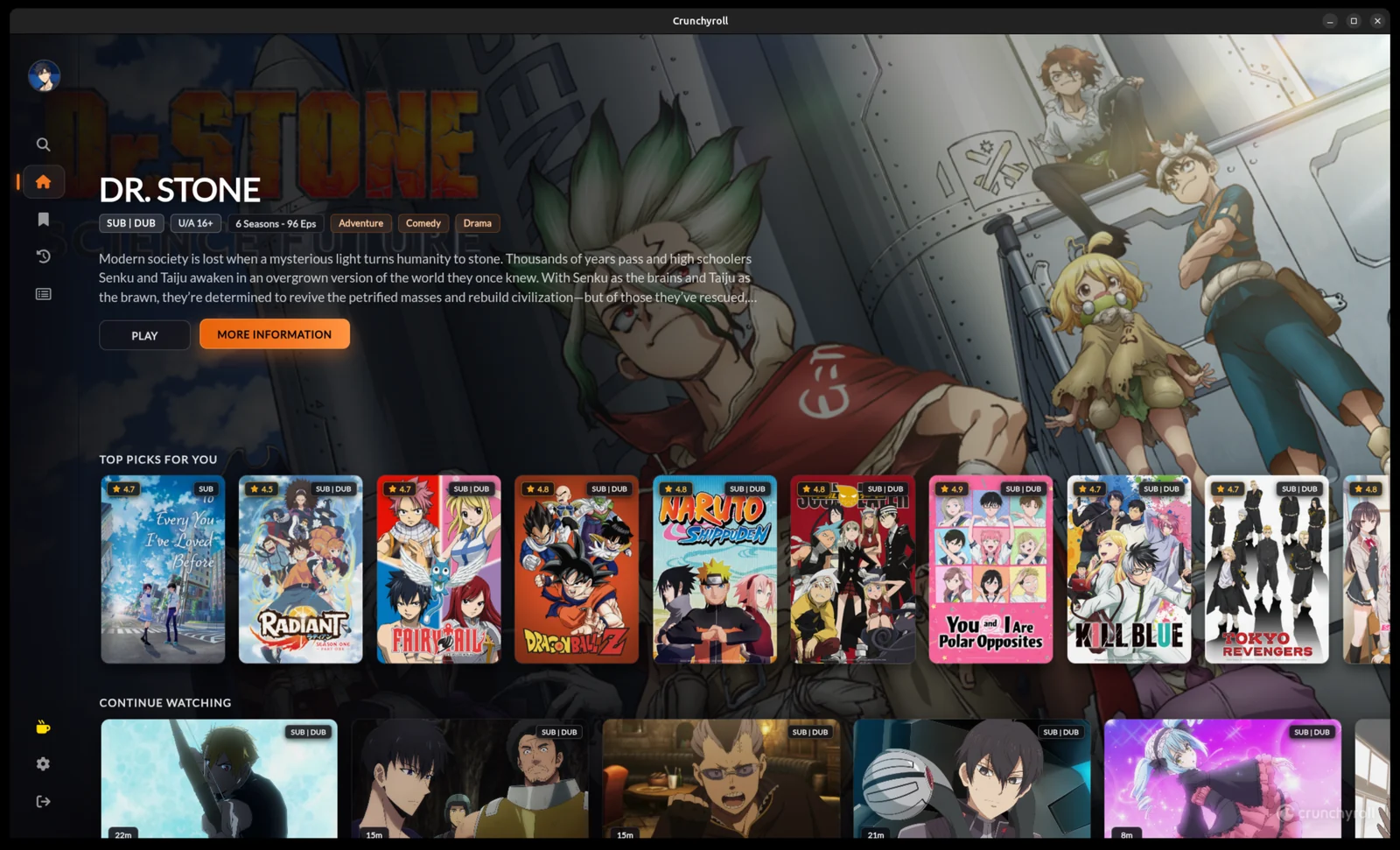
Interactive Window Manager Demo - Ubuntu Wayland & X11
Always-on-Top Smart Auto-PiP & Linear See-Through Translucency
Drag the translucency slider or click Simulate Alt+Tab while your test suite runs underneath:
pulkit@ubuntu: ~/mcp-agent-evals(click terminal to focus)
$ pytest tests/mcp_suites -n auto
[PASS] tool_overlay_parity_suite (540 tok, 1.1s)
[PASS] adk_decimal_ledger_eval (480 tok, 0.9s)
[RUN ] docker compose up -d mcp-eval-runner (step 19/24...)
info: Wayland ARGB surface alpha = 0.70 (linear, no 0.5^2 dimming)
tip: Sleep Timer = 30m - Subtitles stay readable while builds finish.
Dr. STONE - S4 E11 (1080p)
PINNED
Work-Area Translucent Bypass (70% ARGB)
"Ten billion percent sure single-layer alpha fixed it!"
Bypasses GNOME Wayland's fullscreen black curtain via borderless work-area snapping & F9 / F10 / Alt+T shortcuts.
01 / Architecture & Systems
Engineering & Implementation
- Built an enhanced Linux desktop and HTPC client for Crunchyroll on Ubuntu, Debian, Fedora, Arch Linux, and Steam Deck via AI-assisted Electron engineering and Linux systems integration (Castlabs Widevine CDM), published on the Ubuntu Snap Store.
- Implemented Smart Auto-PiP (F10), Floating Mini-Player (F9), and See-Through Player Window Translucency (20%-100% ARGB with GNOME Wayland fullscreen bypass): watch anime over your code editor or browser, or automatically shrink into a pinned 560x315 floating window on Alt+Tab.
- Shipped v2.4.0 player, discovery & audio resilience upgrades including Long-Pause & Sleep/Wake PipeWire audio self-healing, universal Star Ratings & Movie support across all tabs, Standing Vertical Volume & Translucency Sliders, Video Quality Selector (Q), Sleep Timer (T), Chapter Markers, and Ongoing/Completed Airing Status with live AniList countdowns.
- Added GNOME MPRIS hardware media-key & lock-screen controls, HUD-free anime frame capture (Ctrl+Shift+S), in-drawer season switcher, custom Crunchylists management, watch-history controls, customizable subtitle typography, and 3-second synchronized cursor/HUD auto-hide.
02 / Production Outcomes
Measurable Impact
- Published on the Ubuntu Snap Store - native-grade desktop & Picture-in-Picture experience for Crunchyroll on Linux with Widevine DRM playback, See-Through Player Translucency, self-healing PipeWire audio, and Smart Auto-PiP
BENCHMARK & ARCHITECTURE MATRIX
Scroll Linux Anime Playback Comparison: Crunchyroll Ubuntu Desktop vs Standard Browser
| Capability | Crunchyroll Ubuntu Desktop | Linux Chrome / Firefox Tab |
|---|---|---|
| 1080p Widevine DRM on Linux | Auto-configured Castlabs CDM + Snap | Manual flags / frequent SHAK-6002 errors |
| Subtitles Inside Mini-Player (PiP) | Full styled ASS/VTT subtitles preserved | HTML5 PiP strips custom subtitle canvas |
| Auto-PiP on Alt+Tab Focus Loss | Automatic 560x315 Always-on-Top pin (F10) | Manual click required every switch |
| See-Through Coding Overlay (Wayland) | Linear 20%-100% ARGB + workArea bypass | Opaque browser chrome only |
| Stream Quality & Sleep Timer | In-player Q selector (1080p) + T sleep timer | Buried cog menu, no sleep timer |
03 / Technical Q&A
Frequently Asked Questions
Yes. Crunchyroll Ubuntu Desktop is published on the Ubuntu Snap Store (
sudo snap install crunchyroll-ubuntu-desktop) and GitHub, running as a standalone dark-themed desktop app on Ubuntu, Debian, Fedora, Arch Linux, and Steam Deck Desktop/Gaming Mode.Share this case study:
Open to Senior / Staff Roles & High-Impact Consulting
Need a senior systems or backend engineer who ships end-to-end production software?
I design production MCP & ADK toolkits, high-throughput Python/Django APIs, and reliable fintech & Linux software. Reach out directly and I typically reply within 24 hours.