Samsung Galaxy Buds - Ubuntu & Android Seamless Switcher
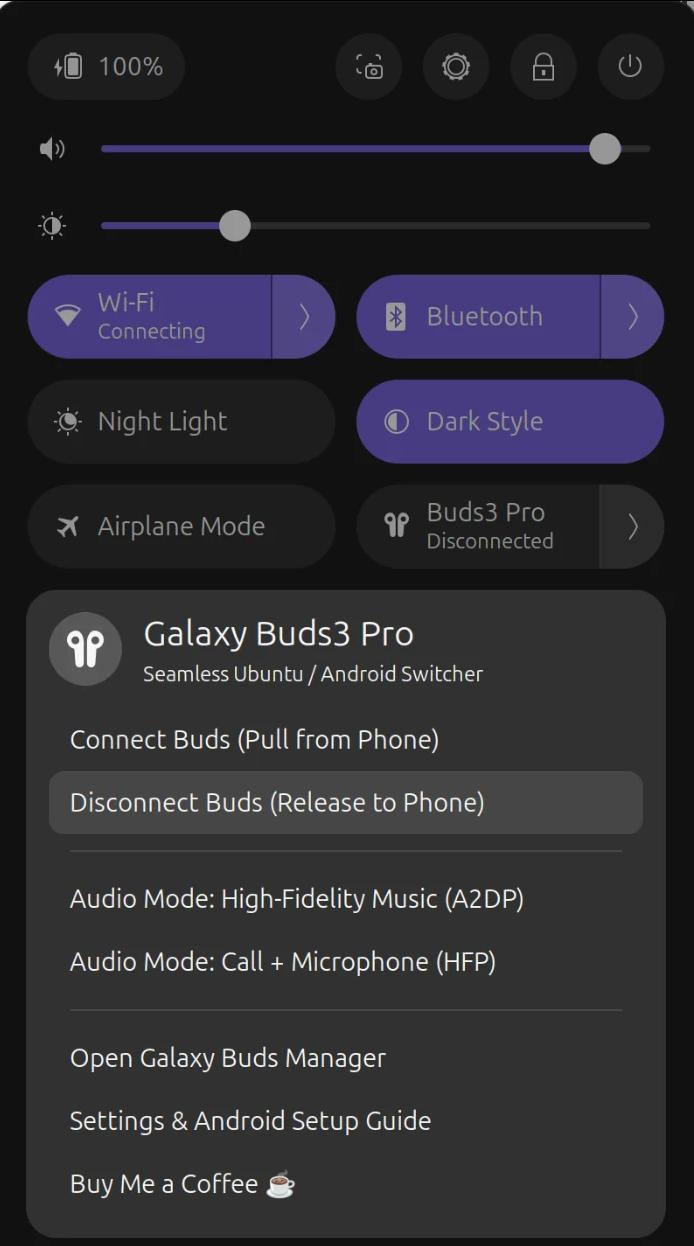
Samsung Galaxy Buds Ubuntu Switcher is an open-source GNOME Shell 45-48 Quick Settings extension, GTK4/Libadwaita preferences app, and Bash CLI (buds / buds-switch) published on the Official GNOME Extensions Store. It provides 1-click Bluetooth multipoint takeover between Ubuntu Linux and Android, PipeWire A2DP/HFP audio profile switching, live battery telemetry, and MacroDroid return webhooks.
Install the official signed GNOME Shell 45-48 extension directly from GNOME Extensions (or search "Samsung Galaxy Buds" in Extension Manager), then click the gear icon in your top-right Quick Settings menu to launch the GTK4 Preferences & Android MacroDroid Setup GUI.
Runs ./install.sh to install the buds / buds-switch terminal CLI, buds-settings desktop launcher, and configure BlueZ D-Bus + MacroDroid webhook handoff between Ubuntu and Android.
$ git clone https://github.com/pulkitmundra/galaxy-buds-ubuntu.git && cd galaxy-buds-ubuntu && ./install.sh && buds-settingsGalaxy Buds GNOME Switcher Preview and Simulator
1-Click Ubuntu BR/EDR Pull, PipeWire Switch & Lid-Close Android Handoff
Simulate how GNOME Quick Settings bypasses BlueZ LE Audio hangs via explicit Classic BR/EDR profiles, routes PipeWire sinks, and uses a systemd-logind inhibitor FD to hand earbuds back to Android before Wi-Fi drops on laptop lid close.
Engineering & Implementation
- Architected a CLI Bluetooth multipoint manager (buds / buds-switch) paired with an AI-assisted GNOME Quick Settings extension and GTK4/Libadwaita setup GUI, published on the official GNOME Extensions Store for all Samsung Galaxy Buds models on Ubuntu 24.04+ (GNOME 45-48).
- Solved the BlueZ dual-mode LE Audio (BAP) vs. Classic BR/EDR contention bug by explicitly connecting A2DP Sink, AVRCP, and HFP profiles over D-Bus, auto-routing PipeWire default sinks via wpctl, and enabling 1-click Music (A2DP) vs. Call + Mic (HFP) profile switching.
- Engineered v1.3.0 Laptop Lid-Close Auto-Handoff to Android via login1 handle-lid-switch pre-sleep interception: sequentially verifies BlueZ ACL teardown and triggers the MacroDroid webhook before NetworkManager sleeps Wi-Fi (including across GNOME idle lock screens), while auto-skipping clamshell external-monitor setups.
- Shipped a native GTK4 / Libadwaita Preferences & Android Setup GUI (prefs.js / buds-settings) with 1-click BlueZ paired Buds auto-detection, live Battery1 percentage telemetry in Quick Settings, and bidirectional CLI <-> GSettings synchronization.
Measurable Impact
- Published on the Official GNOME Extensions Store - One-click & automatic lid-close Bluetooth multipoint audio switching, live battery telemetry, and A2DP/HFP profile control between Ubuntu Linux desktop and Android across all Samsung Galaxy Buds models
Ubuntu Bluetooth Workflow: Galaxy Buds Switcher vs Default GNOME Settings
| Workflow Step | Galaxy Buds Ubuntu Switcher | Default Ubuntu Bluetooth Menu |
|---|---|---|
| Pull Audio from Android Phone | 1 click in Quick Settings or buds connect | Unlock phone -> disconnect -> open GNOME settings |
| BlueZ LE Audio vs Classic BR/EDR | Explicitly binds A2DP + AVRCP + HFP UUIDs | Often stalls or connects without audio sink |
| Music (A2DP) <-> Mic (HFP) Toggle | 1-click PipeWire wpctl profile + default sink | 4+ clicks inside Sound Settings dialog |
| Return Audio to Android Phone | MacroDroid webhook triggers instant phone reconnect | Manual phone Bluetooth menu reconnect |
| Supported Earbuds | Buds3 Pro, Buds3, Buds2 Pro, Buds2, FE, Live, Buds+ | Model-dependent manual pairing |
Frequently Asked Questions
Need a senior systems or backend engineer who ships end-to-end production software?
I design production MCP & ADK toolkits, high-throughput Python/Django APIs, and reliable fintech & Linux software. Reach out directly and I typically reply within 24 hours.